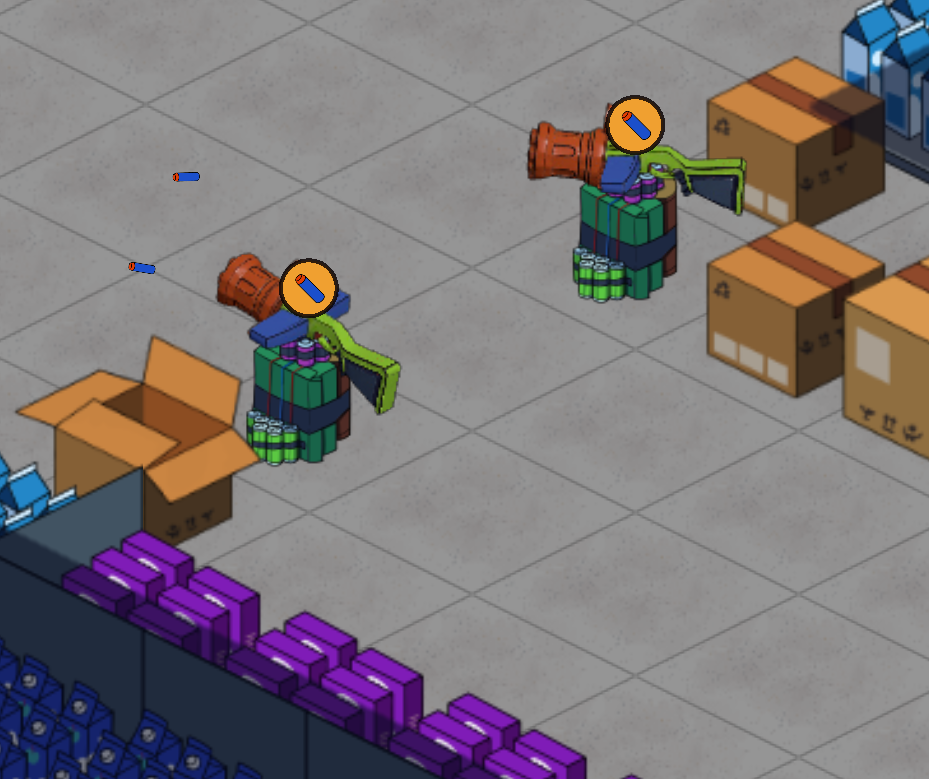
The big change this week: towers run out of ammunition.
If that sounds harsh — it is, in the best way. The magazine number above each tower has been there for builds; for a stretch, it wasn’t actually doing anything. Now it does. Every shot decrements the count, and a tower stops firing when it’s empty. The first time your projectile tower goes quiet halfway through a wave is the moment everything else in v0.45.0 starts to make sense.
Every other change in this update is a tool we’ve handed you for dealing with it.
Send, Push, and Request Resupply
Open the Safe Zone management panel and you’ll find a new section called Tower Resource Allocation. Every built tower with a magazine appears in the list. Pick one, type a number, hit Send. The button shows a “Sending…” state while the transfer is in flight, so you don’t spam-click it; the resource leaves your stockpile and arrives at the tower a tick later.
Underneath that, a Push to FOB section does the same thing for your forward operating bases. Same pattern, different destination — useful when you’d rather stage a buffer closer to where the engineers are working than push it directly to a tower.
And on the third side of the equation, every tower’s context panel now has a Request Resupply button. Click the tower, hit Resupply, the Safe Zone tops it back up on the next tick. The button reads “Waiting for delivery…” and disables itself while the request is in flight, so you can’t queue duplicates by accident.
Three controls, three angles on the same supply line. None of them new mechanically — engineers were dispatching loads in the background already — but you’ve got the lever now.
Each ammunition type has its own shelf
Storage at the Safe Zone is no longer a single pool. Each ammunition type has its own allocated capacity, and the totals add up to a fixed budget the Safe Zone hands you at the start of the night. New − and + buttons in the Storage Capacity panel let you take a chunk of capacity off one resource and put it on another.
Planning a sniper-heavy night? Take some off Construction Material and add it to Heavy Darts. Planning to wall up the back of the store and weather the wave from cover? Shift the budget the other way. The decision is yours, and the budget enforces the trade-off — you can’t have everything.
There’s a freeze rule that catches the obvious mistake. If you drop a cap below your current stockpile of that resource, the stockpile doesn’t get destroyed. It freezes in place, and the production line for that resource pauses until you drain or raise the cap. No data loss, no surprise wipes — just a stall until you sort the budget out.
The forward operating base stockpile got a related pass. Each type now has its own ceiling there too, and Heavy Darts in particular is held tighter so it can’t crowd out Foam Darts and starve the projectile-tower line on long nights.
Mind the magazine
The new low-magazine warning above each tower is the cue you’ll want to learn first.
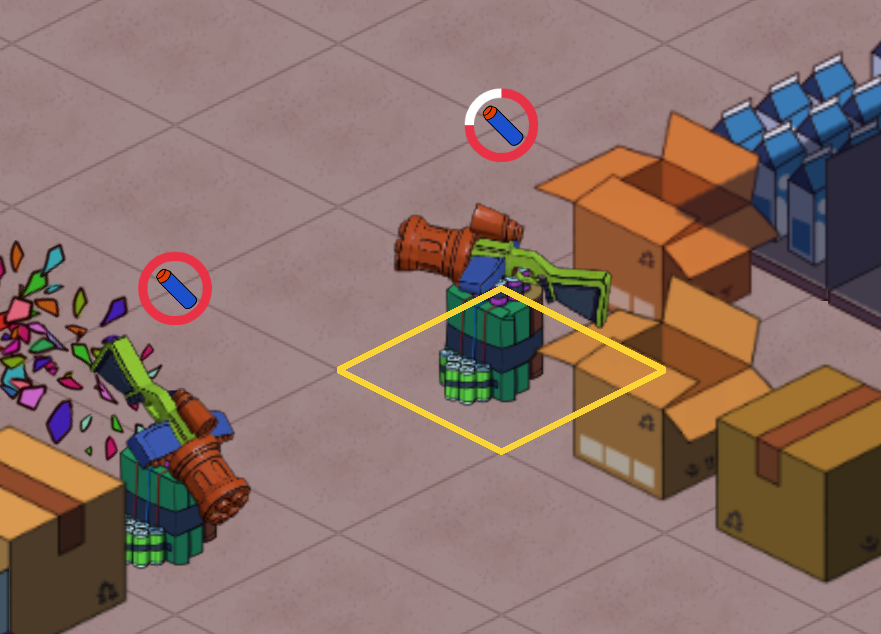
Below half magazine you get an amber disc with the resource glyph. At zero it switches to red, scales up slightly, and pulses. It’s a filled badge with a dark outline so it reads against the busy retail-aisle backgrounds rather than getting lost in the cardboard.
Visible from across the store, no need to click the tower to check its number. See the warning, click the tower, hit Request Resupply. Three clicks, mid-wave, no fumbling through menus.
This wasn’t the first attempt. The earlier pass drew the warning as a red ring with the glyph inside, and it didn’t quite land — the ring blended too easily with selection rings and other circular UI elements floating around the towers. The filled-disc version reads cleaner.
The whole supply panel rebuilt
The Safe Zone management panel got a full UI pass while we were in there. Storage Capacity, Tower Resource Allocation, and Push to FOB now share a single row template — same icon size, same column widths, same button widths edge-to-edge across all three sections.
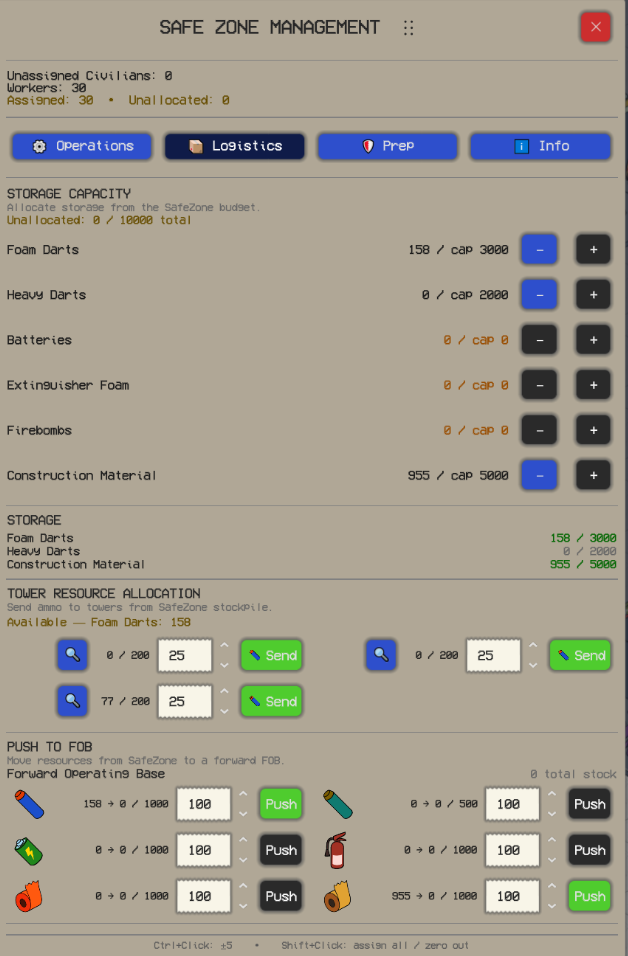
The screenshot above is an in-progress view from earlier in the week. Storage Capacity sits at the top with −/+ allocators per resource, Tower Resource Allocation in the middle lists each built tower with a Send button, and Push to FOB at the bottom shows each ammunition type with its own icon and a Push button alongside it.
The top bar got a redesign too. Construction Material is shown as an icon-and-number pair; Foam Darts and Heavy Darts get their own pairs beside it when the level produces them. Hover any of them for a tooltip showing the split between Safe Zone stock and forward base stock.
Heavy Darts and Firebombs both got proper artwork in the process. Heavy Darts has its own green-dart glyph instead of the foam-dart art with a green tint, and Firebombs has an incendiary-bottle icon instead of the Construction Material roll with a red overlay. The dedicated artwork reads as a different ammunition type at a glance; the old tinted-fallback approach didn’t.
The whole logistics layer is still in the early stages of testing, and we’d love your feedback on how it plays. We’re looking for the balance point between meaningful resource management and fun, fluid gameplay — if it’s tipping too far one way for you, tell us. The Discord is the fastest way to reach us.
Bug fixes
- Disabled-tower resources no longer leak into the Safe Zone panels — if a level has the laser tower, bombardier, or extinguisher switched off, their resources don’t appear as empty rows in the management lists.
- The currency display in the top bar matches what the Safe Zone is actually producing now, instead of showing a separate counter that was lagging behind.
- The Send, Push, and Request Resupply commands have started actually executing rather than piling up in the queue.
- Tower names in the Allocation list no longer collapse to nothing when the panel is tight — long names ellipsis after a sensible minimum width.
v0.45.0 is live now on the Steam playtest app and on itch.io for Windows.